
E-signature for roofing contracts
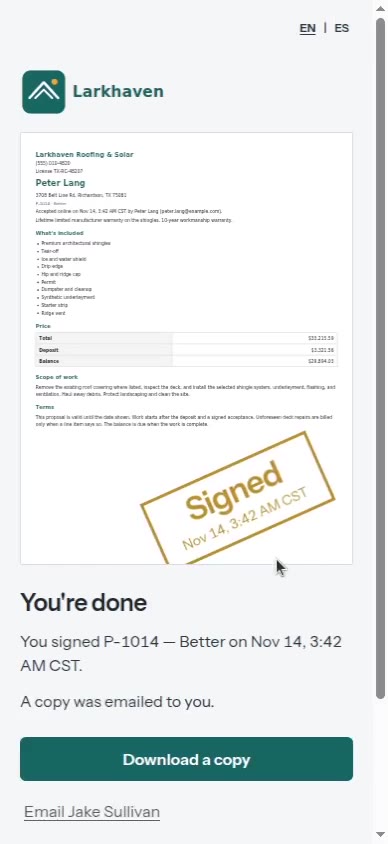
Upload your contract, place the fields, and send it. The homeowner signs on their phone, and you keep the signed file and the audit trail.
The problem
-
Driving a contract across town
to get a signature slows the job.
-
A signed file
buried in email is hard to find later.
-
You need to know who signed,
and that the file was not changed after.
How it works
-
01
Upload the contract
Start with your contract PDF.
-
02
Place the fields
Drag and drop signature, initial, date, and text fields.
-
03
Send it
Send it to one signer or several. Start from a template, and send a reminder if it sits.
-
04
Watch it get signed
Track sent, viewed, and signed. The homeowner signs on their phone. No account needed. Signed documents are locked.
What you get
- Upload your contract PDF
- Drag and drop signature, initial, date, and text fields
- Multiple signers
- Templates and reminders
- Track sent, viewed, and signed
- Signed documents are locked
- An audit trail and a signer consent record
- Homeowners sign on their phone, with no account
Common questions
Is an electronic signature legal on a roofing contract?
In the US, electronic signatures are generally valid under the ESIGN Act and UETA. Pitchvana keeps an audit trail and consent record for each signature. For advice on your contracts, talk to your attorney.
Does the homeowner need an account?
No. They sign on their phone. No account needed.
Can more than one person sign?
Yes. You can send the contract to multiple signers.
Can I reuse a contract?
Yes. Save a template and send it again. You can also send reminders.
What happens after they sign?
You can see sent, viewed, and signed. Signed documents are locked. Each one keeps an audit trail and a signer consent record.
What fields can I place?
Signature, initial, date, and text fields. Drag them onto your contract PDF.
See Pitchvana on your own roof.
First month free. Then $99/mo for 3 months, then $149/mo, locked for as long as you stay.